Tuesday, December 10, 2013

Bean Wiring


No bean is an island. For bean to be of any use it will have to get to know other beans and gain some identity

Bean Wiring is piecing/collaborating together beans within the Spring container.When wiring beans, you tell the container what beans are needed and how the container should use Dependency Injection to tie them together.

I have already discussed in my previous blog about several spring containers support wiring through XML:

  1. XmlbeanFactory
  2. ClassPathXmlApplicationContext
  3. FileSystemXmlApplicationContext
  4. XmlWebApplicationContext

Here before going through Bean Wiring I will be discussing a lit bit on the Spring configuration file.
Let's take an example of spring configuration File:

<?xml version="1.0" encoding="UTF-8"?>
<beans xmlns="http://www.springframework.org/schema/beans" 
    xmlns:xsi="http://www.w3.org/2001/XMLSchema-instance"
    xsi:schemaLocation="http://www.springframework.org/schema/beans
    http://www.springframework.org/schema/beans/spring-beans-3.0.xsd">

<bean id="firstSpringExample" class="com.spring.examples.FirstSpringClass">
<property name="name" value="Sam This is my first Spring Example.." />
</bean>

<bean id ="bustedCar" class="com.spring.examples.SimpleCar"/>
</beans>

 If you noticed I have marked some words in black colour like:
<beans> : is the root element. It has one or more than one <bean> element.
<bean> :  defines a JavaBean or any Java Object.


Adding a Bean

Adding a bean to the Spring container is as simple as adding a  <bean> element to the xml file.

<bean id = "foo" class = "com.springExample.FirstExample" />


Initialization and Destruction


<bean id ="connection" class= "com.spring.MyConnection" init-method ="initialize" destroy-method = "close" />


Call setup() when bean is loaded into the container.

call teardown() when bean is unloaded from the container.


eg: A typical example of this would be connection pooling bean;


public class MyConnection {


public void initialize(){

 //initialize connection pool

}


public void close(){
  //color release connections
}


 Defined in this way the initialize method will be called immediately after MyConnection  object is created and close method will be called just before the bean is removed from the container and the database connection gets released.


Spring also provides two interfaces that perform the same functionality:
1. InitializingBean
2. DisposableBean

The InitializingBean interface  provides one method afterPropertiesSet() that will be called once all of a bean's properties have been set.
Similarly DisposableBean's one method destroy() will be called when the bean is removed from the container.

Advantage of InitializingBean and DisposableBean over init-method and destroy-method:
Spring container automatically detects beans that implement these interfaces and invokes their methods without any configuration.

 
Disadvantage of InitializingBean and DisposableBean over init-method and destroy-method:
Using this approach we tied our beans to Spring API.

When or Where to Use InitializingBean and DisposableBean:
The only scenario where you might favor Spring's interfaces is when you are developing a framework bean that is to be used specifically within spring Container.

Referencing Other Beans :

<bean id = "foo" class = "com.springExample.FirstExample" >
     <property name = "bar"> 
         <ref  bean =  "Bar"/>
    </property>
</bean.

<bean id = "Bar" class = "com.springExample.BarExample" >


<?xml version="1.0" encoding="UTF-8"?>
<beans xmlns="http://www.springframework.org/schema/beans"
       xmlns:xsi="http://www.w3.org/2001/XMLSchema-instance"xmlns:p="http://www.springframework.org/schema/p"
       xsi:schemaLocation="http://www.springframework.org/schema/beans
               http://www.springframework.org/schema/beans/spring-beans-3.0.xsd">

<bean id="FirstBean" class="com.spring.beanReference.FirstBean">
              <property name="secondBean">
                     <ref local="SecondBean" />
              </property>
       </bean>

       <bean id="SecondBean" class="com.spring.beanReference.SecondBean"/>
</beans>

package com.spring.beanReference;

public class FirstBean {
       private String studentName;
       private SecondBean secondBean;

       public String getStudentName() {
              return studentName;
       }

       public SecondBean getSecondBean() {
              return secondBean;
       }

       public void setSecondBean(SecondBean secondBean) {
              this.secondBean = secondBean;
       }

       public void setStudentName(String studentName) {
              this.studentName = studentName;
       }

}


package com.spring.beanReference;

public class SecondBean {
       private int studentAge;

      
       public int getStudentAge() {
              return studentAge;
       }

       public void setStudentAge(int studentAge) {
              this.studentAge = studentAge;
       }

}


package com.spring.beanReference;

import org.springframework.context.ApplicationContext;
import org.springframework.context.support.ClassPathXmlApplicationContext;

public class BeanReferenceMain {

       /**
        * @param args
        */
       public static void main(String[] args) {
              // TODO Auto-generated method stub
              ApplicationContext ctx =  new ClassPathXmlApplicationContext("config.xml");
              FirstBean firstBean =  (FirstBean) ctx.getBean("FirstBean");
              firstBean.setStudentName("Amir Khan");
              SecondBean secondBean =  firstBean.getSecondBean();
              secondBean.setStudentAge(20);
              firstBean.setSecondBean(secondBean);
              System.out.println("Student Name  is  : " + firstBean.getStudentName());
              System.out.println("Student Age  is  : " + firstBean.getSecondBean().getStudentAge());
             
       }

}


Inner Beans :


<bean id = "foo" class = "com.springExample.FirstExample" >
     <property name = "bar"> 
         <bean class = "com.springExample.BarExample" >
    </property> 
</bean> 

Drawback of Inner beans :
Instance of the Bar Example cannot use by other beans 

Advantage:
Instance of the Actual Bean (BarExample) cannot be accessible without a wrapper bean (FirstExample), lets say when we are creating AOP proxy we dont want the target bean to be accessible in our BeanFactory. 


<?xml version="1.0" encoding="UTF-8"?>
<beans xmlns="http://www.springframework.org/schema/beans"
       xmlns:xsi="http://www.w3.org/2001/XMLSchema-instance" xmlns:p="http://www.springframework.org/schema/p"
       xsi:schemaLocation="http://www.springframework.org/schema/beans
               http://www.springframework.org/schema/beans/spring-beans-3.0.xsd">

<bean id="InnerBeanClassA" class="com.spring.beanReference.InnerBean.InnerBeanClassA">
<property name="innerBeanClassB">
   <bean id="InnerBeanClassB" class="com.spring.beanReference.InnerBean.InnerBeanClassB"         </property>
  </bean>
</beans>


package com.spring.beanReference.InnerBean;
public class InnerBeanClassA {
       private String studentName;
       private InnerBeanClassB innerBeanClassB;

       public String getStudentName() {
              return studentName;
       }
       public void setStudentName(String studentName) {
              this.studentName = studentName;
       }
       public InnerBeanClassB getInnerBeanClassB() {
              return innerBeanClassB;
       }
       public void setInnerBeanClassB(InnerBeanClassB innerBeanClassB) {
              this.innerBeanClassB = innerBeanClassB;
       }
}


package com.spring.beanReference.InnerBean;
public class InnerBeanClassB {
       private int studentAge;

       public int getStudentAge() {
              return studentAge;
       }

       public void setStudentAge(int studentAge) {
              this.studentAge = studentAge;
       }
}


package com.spring.beanReference.InnerBean;

import org.springframework.context.ApplicationContext;
import org.springframework.context.support.ClassPathXmlApplicationContext;
public class InnerClassMain {
       /**
        * @param args
        */
       public static void main(String[] args) {
              // TODO Auto-generated method stub
              ApplicationContext ctx =  new ClassPathXmlApplicationContext("config.xml");
              InnerBeanClassA innerBeanClassA =  (InnerBeanClassA) ctx.getBean("InnerBeanClassA");
              innerBeanClassA.setStudentName("Tom Cruise");
              InnerBeanClassB innerBeanClassB =  innerBeanClassA.getInnerBeanClassB();
              innerBeanClassB.setStudentAge(25);
              innerBeanClassA.setInnerBeanClassB(innerBeanClassB);
              System.out.println("Student Name  is  : " + innerBeanClassA.getStudentName());
              System.out.println("Student Age  is  : " + innerBeanClassA.getInnerBeanClassB().getStudentAge());
       }
}


Wiring Collections

Collections Supported by Spring's Wiring
1.List
2. Set
3. Map
4. Props


1. Wiring List: can be of any type element, ref or even another List

<bean id = "foo" class = "com.springExample.FirstExample" >
     <property name = "bar"> 
         <list>
              <value>bar1</value>
               <ref bean = "bar2"/>
         </list>
    </property> 
</bean> 

Usage: 

Spring integration with hibernate we wire LocalSessionFactorybean into the container. The LocalSessionFactoryBean has a mapping resource property that takes a list of String containing the names of Hibernate Mapping files.

e.g.

<bean id = "sessionfactory" class = "org.springframework.orm.hibernate.LocalSessionFactoryBean" >
     <property name = "mappingResources"> 
         <list>
              <value>/com/springAction/Course.hbm.xml</value>
              <value>/com/springAction/Student.hbm.xml</value>
              <value>/com/springAction/Department.hbm.xml</value>
        </list>
</property> 
</bean> 


2. Wiring Set: wiring set beans to guarantee uniqueness.

<bean id = "foo" class = "com.springExample.FirstExample" >
     <property name = "bar"> 
         <set>
              <value>bar1</value>
               <ref bean = "bar2"/>
         </set>
    </property> 
</bean> 

Set and List are almost the same the only difference is <list> wires values to a java.util.list or an array and <set> wires values to a java.util.set.


3. Wiring Maps: different from List and  Set and each entry in a map is made up of key and value defined by the <entry> element. Can add element, list, ref or another map

<bean id = "foo" class = "com.springExample.FirstExample" >
     <property name = "bar"> 
         <map>
              <entry key = bar1>
                   <value>bar1</value>
              </entry>
         </map>
    </property> 
</bean> 


4. Wiring Properties: different from List and  Set and each entry in a map is made up of key and value defined by the <entry> element. Can add element, list, ref or another map

<bean id = "foo" class = "com.springExample.FirstExample" >
     <property name = "bar"> 
         <map>
              <entry key = bar1>
                   <value>bar1</value>
              </entry>
         </map>
    </property> 
</bean> 
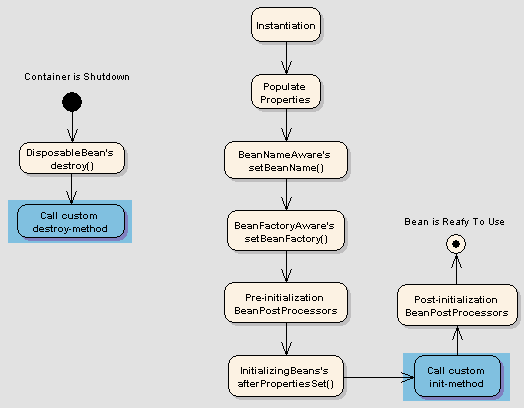
Bean LifeCycle

Life Cycle of a bean is fairy simple and a bit elaborate .When a bean is instantiated, it may be required to perform some initialization to get it into a usable state. Similarly, when the bean is no longer required and is removed from the container, some cleanup may be required. 
It is important to understand Bean life cycle to take advantage of some of the opportunities that Spring offers to customize how the bean is created.

Bean Provides Life cycle for both the container Bean Ffactory and Application Context. Here we will look into both the life cycles:  


Life cycle of a bean within Spring Bean Factory:


a. Spring container finds the bean definition from the XML file and instantiates the bean.

b. Using the dependency injection, Spring populates all of the properties as defined in the bean definition.

c. If the bean implements BeanNameAware interface then
                   Container calls bean.setBeanName(bean id)

d.  If the bean implements BeanFactoryAware interface then 
                   Container calls bean.setBeanFactory(container)

e. If  there are any BeanPostProcessors associated with the bean 
                  Container calls postProcessBeforeInititialization() method 

f.  If bean instance of InitializingBean
1.     Container calls bean.afterPropertiesSet()


      public class TestBean implements InitializingBean {
          public void afterPropertiesSet() {
             // do some initialization work
         }

      }


2.      If bean declares custom init method
1.     Container calls custom init() method of bean

g. If  there are any BeanPostProcessors associated with the bean 
                   Container calls postProcessAfterInititialization() method 


h. BEAN IS READY TO USE

After step h, the container has returned the bean to the application, and the application works with the methods of the bean.
When the application is shutting down, it will result in the container being destroyed too. Before that there are a few steps:

i. If bean instance of DisposableBean
1.     Container calls the bean.destroy()


      public class ExampleBean implements DisposableBean {
         public void destroy() {
             // do some destruction work
         }
      }
2.      If bean declares custom destroy method
1.     Container calls custom destroy() method of bean

j. BEAN IS READY FOR GARBAGE COLLECTION.


Life cycle of a bean within Spring Application Context:


The only difference here is that if the bean implements the ApplicationContext interface, the setApplicationContext() method is called.


Next Page > Bean Scope